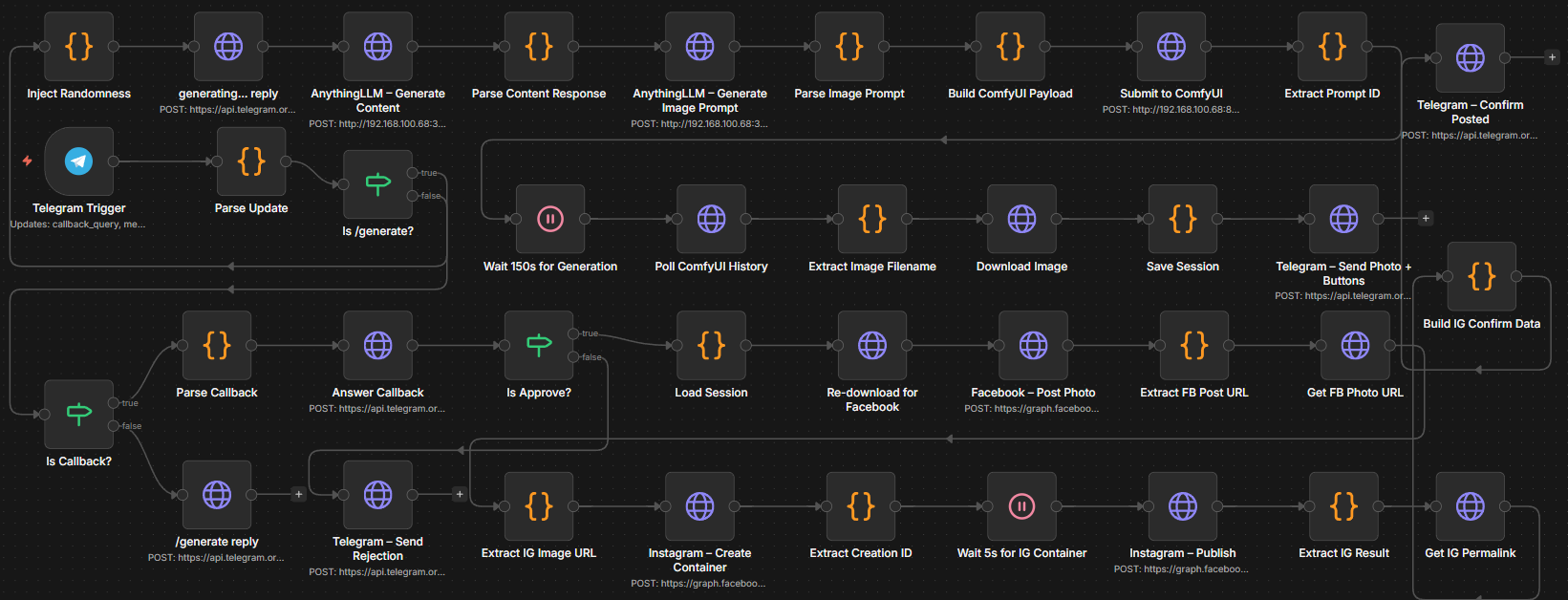
The Core Concept
The Local-AI Social Media Factory is a strategic response to the rising costs of “AI-as-a-Service.” While most businesses rely on expensive monthly subscriptions to OpenAI or Midjourney, this system demonstrates how a local-first architecture can provide 100% data privacy and zero recurring API costs.
By running industrial-grade models on local hardware, I engineered a pipeline that handles the “content treadmill”—from trend analysis to graphic design—without sending a single byte of proprietary strategy to the cloud.
The Engineering Challenge
The “API Tax” Problem
For agencies and small businesses, scaling content usually means scaling expenses. Recurring costs for ChatGPT, Canva, and Zapier destroy profit margins.
The Solution: Strategic Infrastructure
I followed a simple economic principle: High upfront hardware investment yields lower long-term operational costs. By orchestrating local LLMs and image generators via Docker, the system moves content through four distinct stages of production:
- Ingestion: Scraping tech trends or local news.
- Synthesis: Copywriting using Llama 3.1.
- Visualization: Generating brand-consistent assets via Stable Diffusion.
- Verification: A “Human-in-the-loop” approval via Telegram.
Technical Architecture
The stack is built on a modular, containerized environment to ensure scalability and reliability.
| Layer | Technology | Role |
|---|---|---|
| Orchestration | n8n (Docker) | The “brain” managing the flow of data between nodes. |
| LLM Inference | Llama 3.1 (8B Q8) | Handles creative copywriting and post formatting. |
| Image Engine | ComfyUI + SDXL | Generates context-aware marketing visuals. |
| Gateway | Ngrok / Telegram API | Facilitates secure remote approval and publishing. |
Key Features
1. The “Mara” Persona Engine
To prevent the “robotic” feel of standard AI output, I developed a custom marketing persona named Mara.
- Sensory Hooks: Grabs attention in the first three words.
- Local Compliance: Automatically references local regulations (BIR, SSS, PhilHealth) to build trust in the Philippine market.
- Zero-Fluff Filter: Strips away common AI idioms like “Unlock your potential” or “In today’s fast-paced world.”
2. Human-in-the-Loop (HITL) Guardrails
Fully autonomous posting is a branding risk. I integrated a Telegram-based approval system. The engine sends a draft post (Image + Caption) to a private bot; with one tap, the user can approve, regenerate, or edit the post before it goes live on LinkedIn or Instagram.
3. GPU Optimization
Running these models locally requires careful VRAM management. The system is optimized for mid-range hardware (RTX 3060/4070), using Quantized models (GGUF) and Docker-based resource capping to maintain system stability during high-load generations.
The Impact
By shifting from a SaaS-dependent workflow to this local engine, the system achieves:
- 90% Reduction in content creation time.
- Zero API Fees for text and image generation.
- 100% Data Sovereignty: Your marketing strategy never leaves your server.
Lessons Learned & Future Roadmap
This project taught me the intricacies of Local AI Infrastructure and the importance of GPU optimization. Engineering a bridge between n8n and local Python-based AI environments (like ComfyUI) proved that local hardware is now capable of matching cloud performance for specific enterprise tasks.
What’s next?
- Short-Term: Developing a multi-client dashboard for agency use.
- Long-Term: Transitioning the architecture into a White-label SaaS product for local marketing firms.
How to Run This Project
Ready to own your infrastructure?
- Environment Setup: Ensure you have an NVIDIA GPU (12GB+ VRAM recommended).
- Clone & Launch:
git clone [https://github.com/jerohalili/Content-Creation-AI-Automation.git](https://github.com/jerohalili/Content-Creation-AI-Automation.git) cd Content-Creation-AI-Automation docker-compose up -d - Run ComfyUI: Link the Custom Model Workflows API to n8n
- Run AnythingLLM: Link the Custom Model LLM API to n8n
- Ready n8n: Import then link the n8n Workflow to Telegram
- Run n8n: Customize the n8n Workflow with prompts and parameters
- Use Telegram: Publish the n8n Workflow and use online in Telegram